Blue Temp Sensor & Brown

Need technical Q/A then you're in the right place

Moderator: martauto

cliffybabe
Powered by Nelly
Powered by Nelly
Posts: 10020
Joined: Sun Dec 18, 2005 11:00 pm
Location: Croydon

Post Sun Dec 03, 2006 7:48 pm

Guys I wanna change out these sensor's as I have read alot about them resolving heating issue's etc.

What the part numbers for them?? I have tried searching but can tfind the part numbers

am i right in thinkging there parts 12 & 13??
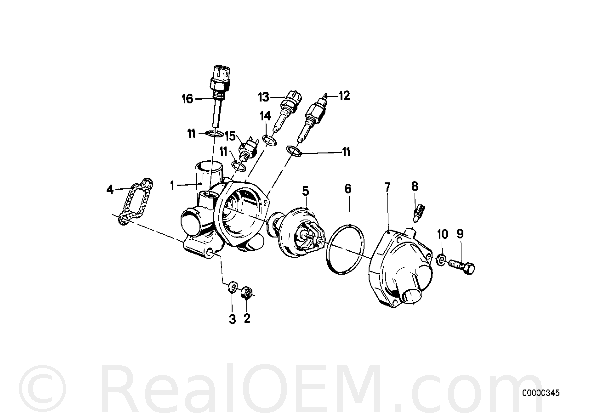
Image

12 ENGINE COOLANT TEMP SENSOR 12621710512
13 TEMPERATURE SENSOR 13621709966

Thanks
Neil
Image
Considering Selling the Cabby, looks like its gonna go
Chris-W
E30 Zone Team Member
Posts: 7219
Joined: Tue May 24, 2005 11:00 pm
Location: South Cheshire

Post Sun Dec 03, 2006 7:57 pm

More like 13 & 16.
Image
gcorky
Boost Junkie
Posts: 2009
Joined: Tue Jul 12, 2005 11:00 pm
Location: n.e england

Post Sun Dec 03, 2006 9:04 pm

etk doesnt show 16 for our car but looks more like we have?although 12 and 13 are in correct position on housing and are listed?
Image

525 sport
User avatar
Brianmoooore
E30 Zone Team Member
Posts: 49360
Joined: Mon Jan 10, 2005 11:00 pm

Post Sun Dec 03, 2006 9:25 pm

Don't take any notice of what they look like in the pics. The parts often don't look anything like them.
If you enter your VIN, then the only parts listed should be the correct ones for your car.
Note that changing the brown one might just change the position of the temperature gauge needle, but will have no effect whatsoever on the running of the engine.
Wonder if one of the other sensors is the switch for the check panel overheat light?
Chris-W
E30 Zone Team Member
Posts: 7219
Joined: Tue May 24, 2005 11:00 pm
Location: South Cheshire

Post Mon Dec 04, 2006 9:11 am

Brianmoooore wrote: Wonder if one of the other sensors is the switch for the check panel overheat light?
Good point - might well be.
Image
User avatar
Brianmoooore
E30 Zone Team Member
Posts: 49360
Joined: Mon Jan 10, 2005 11:00 pm

Post Mon Dec 04, 2006 9:19 am

15 is the one that looks like a switch - but then, you can't go by the pictures.
You can set the ETK to show all parts, IIRC, so this should identify it.

Chris-W
E30 Zone Team Member
Posts: 7219
Joined: Tue May 24, 2005 11:00 pm
Location: South Cheshire

Post Mon Dec 04, 2006 9:27 am

Brianmoooore wrote:You can set the ETK to show all parts, IIRC, so this should identify it.
Let me know how to do this if you get a chance? Have been trying to figure that out.
Image
User avatar
Brianmoooore
E30 Zone Team Member
Posts: 49360
Joined: Mon Jan 10, 2005 11:00 pm

Post Mon Dec 04, 2006 9:30 am

Can't help you. Since my hard drive failure a few months ago, and my subsequent re install using Windows XP pro, I can't install the ETK!!
GDBN
E30 Zone Camper
E30 Zone Camper
Posts: 1415
Joined: Fri Apr 08, 2005 11:00 pm
Location: Copenhagen

Post Mon Dec 04, 2006 4:58 pm

Neil ... doubt it will do anything to resolve "heat issues".
The brown will give a slightly different reading on the dash and the blue may make it idle better.

G
Chris-W
E30 Zone Team Member
Posts: 7219
Joined: Tue May 24, 2005 11:00 pm
Location: South Cheshire

Post Mon Dec 04, 2006 5:00 pm

Brianmoooore wrote:Can't help you. Since my hard drive failure a few months ago, and my subsequent re install using Windows XP pro, I can't install the ETK!!
Lousy luck. Time to get a Toshiba Libretto & keep the ETK in your pocket!
Image
